Description
Display, gift, enjoy: get creative with the Canon Photo Cube!
Whether it’s to document our children’s milestones, capture that perfect holiday sunset or immortalise an important friendship, many of us are constantly taking photos and creating memories. But often our favourite snaps are either left saved on a camera, memory card, in the cloud, or printed out and lost among household chaos.
Making physical copies of your photos makes them a part of your environment, giving them the attention they deserve and letting you browse through special memories with friends or display them somewhere prominent to make you smile every time you pass them. The Canon Photo Cube is specially designed to keep your images safe and easy to access, offering not just the perfect storage solution, but lots of potential ways to get creative and display your treasured moments, too.
What is Canon Photo Cube?
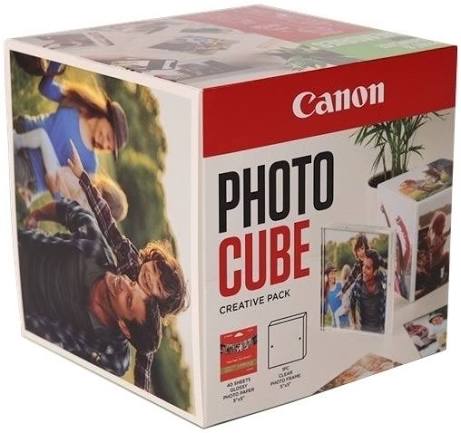
The Canon Photo Cube is a fun way to store square-shaped photos which appeal across generations – whether they remind you of the retro prints of your youth or more modern social media shots – helping to create a portable photograph album the whole family can enjoy.
The Photo Cube can be displayed anywhere in your home, becoming a part of the decor, or it can be a thoughtful personalised photo gift for someone special.
The Canon Photo Cube measures 14 x 13.9 x 13.5cm, and is designed to store square-shaped 12.7 x 12.7cm photos. It’s the perfect size to creatively display photos around your home, whether it’s on a bedside table, bookshelf or mantelpiece, and light enough to lift easily and enjoy.
Hot To Use:
1. Select the images you’d like to print on your laptop, tablet or smartphone. You may decide to use your Canon Photo Cube to store and display holiday photos, use it as an ever-evolving family album, or as a gift for someone’s birthday. Think about which images best suit your needs.
- If you want to add extra creative flourishes or personalisation, use one of Canon’s printing apps to add final details to your designs, such as Canon Easy-PhotoPrint Editor to add text, frames or symbols.
- Your Photo Cube pack comes complete with square glossy photo paper, so feed it into your compatible Canon printer and print the final images.
- If you have the Creative Pack, choose six of your favourite images, or the ones you think will have the most impact, and stick them on the outside of your Photo Cube.
- Put the remainder of the photos inside the Photo Cube for safe keeping.
- If you have the Creative Pack with the Photo Cube Frame, select an image and install it into the frame. Remember you can arrange two photos back-to-back so that there’s a different image showing on each side.
- Now you’re ready to display your Photo Cube and Frame in your home or gift them to someone special.
Compatible with all Canon printers excluding Canon i-Sensys laser printers and Canon Maxify “MB” range (MB21XX, MB27XX, MB51XX & MB54XX series)
What’s in the box
1x Canon Photo Cube
1x Clear Photo Frame
1x Pack of 40 sheets 5″” x 5″” Glossy Photo Paper (Square)